
Your store. On their home screen. In 14 days.
We turn any e-Commerce platform into a native mobile app using technology we have already built — synced to the store you run today, with nothing to migrate and no second inventory to manage.
A browser tab is rented. A home screen icon is owned.
Your mobile site has to be found again every single time — through a search, a bookmark, an ad you paid for twice. An app sits on the device, stays signed in, keeps the cart, and can tap the customer on the shoulder for free.
Four steps. About two weeks.
The technology already exists — that is why this is fast. The time goes into making it yours and getting it through the stores.
Most app builders only speak Shopify.
Which is fine if you are a DTC brand on Shopify. If you are on Adobe Commerce, BigCommerce, WooCommerce or something built for you, the off-the-shelf tools simply do not apply — and that is most manufacturers, distributors and established retailers.
We are platform-agnostic because our technology connects to the store rather than replacing it. That is the moat, and it is why we can quote a fixed price and a fixed date on a stack a template vendor would refuse.
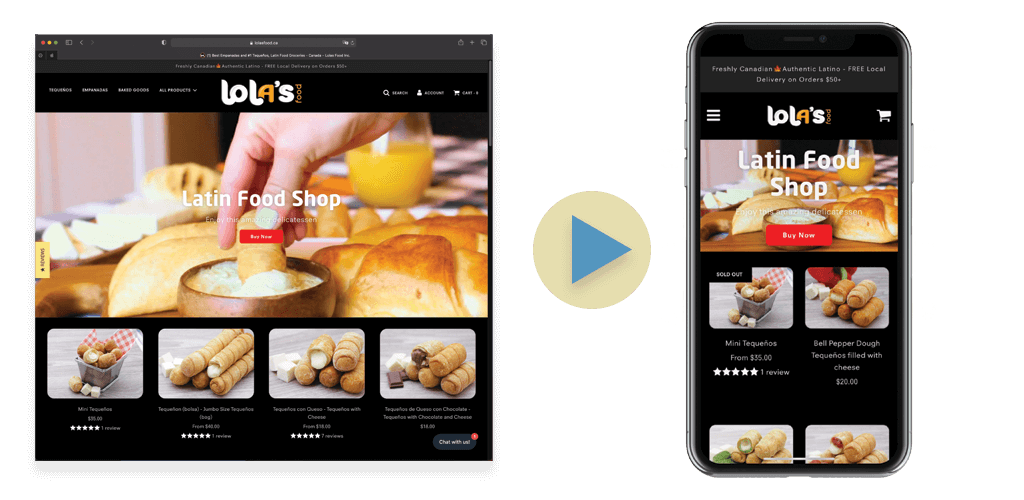
Lola’s app not only helped us increase sales on mobile — it turned our business into a mobile-friendly platform customers love.
 Mateo MaslovGeneral Manager, Lola’s Food Inc.
We run commerce at scale on the other side of the desk.
TAPQUAD®’s commerce practice is led from inside a multi-site Adobe Commerce portfolio spanning B2B and DTC. So when your catalogue has customer-specific pricing, awkward variants or an ERP in the middle, we have already met it.
Straight answers.
How do you turn my store into a mobile app?
We connect our app technology to the store you already run. Your catalogue, pricing, inventory and orders stay exactly where they are — the app reads from the same engine, so there is nothing to rebuild and nothing to migrate.
Which platforms do you support?
Shopify, WooCommerce, Adobe Commerce (Magento), BigCommerce, headless and fully custom builds. In principle any online store can be enabled for mobile commerce — what we check at scoping is what your platform exposes, not whether it appears on a supported list. Platform-agnostic is the whole point — most app builders are Shopify-only, which rules out the majority of real stores.
How fast is it really?
About 14 days from kickoff to a submitted app. The build itself is quick because the technology already exists; the time goes into your branding, catalogue mapping, testing and store submission.
Do I need to change my website or run two inventories?
No. One catalogue, one inventory, one set of pricing rules. Nothing about your existing store has to change, and there is no second system to maintain.
Will it be a web wrapper or a native app?
Native. Wrappers get rejected by the stores, feel slow, and cannot use push notifications or device features properly.
How does an app beat a mobile-friendly website?
A browser tab has to be found again every time. An app sits on the home screen, keeps the customer signed in, remembers the cart and can send a push notification — which for any business that relies on repeat orders is the difference between being remembered and being searched for.
Who handles App Store and Google Play submission?
We do. Submission, store listings, review responses and ongoing OS updates are handled for you, and we stay on it if a build gets rejected.
What happens if Apple or Google rejects the app?
Most rejections come down to privacy policy requirements or content the stores do not permit. We build to the App Store and Google Play rules from the start and follow the applicable laws, so it rarely comes up — and if a review does come back, we respond, correct it and resubmit.
Can I keep my existing payment gateway?
Yes. We work with what you already have rather than forcing a migration.
Will my customer-specific or contract pricing carry through?
Yes. The app reads the same pricing rules your store already applies, including customer-specific rates, tiers and quantity breaks, so a logged-in buyer sees what they should see.
What does maintenance look like after launch?
Once the app is live we put a maintenance contract in place. Apple and Google make changes that are mandatory — SDK levels, privacy declarations, deprecated APIs — and the contract keeps your app current with them, so it is never pulled or blocked for being out of date.
Put your store on their home screen.
Tell us what platform you run and roughly how many orders a month. You will get a fixed price and a launch date, not a range.